On a recent client project, a marketing team was struggling with an understaffed data science department who were unable to get essential data into the central warehouse for analysis. This data was from a 3rd party provider, was delivered twice a year, and consisted of thousands of individual fixed-width text files that varied in length from dozens to hundreds of rows.
The team needed a way to grab two columns of data from each one of those text files, and import it to their warehouse for analysis. Luckily, this was a problem that could be solved with a little elbow grease, and a little R know-how.
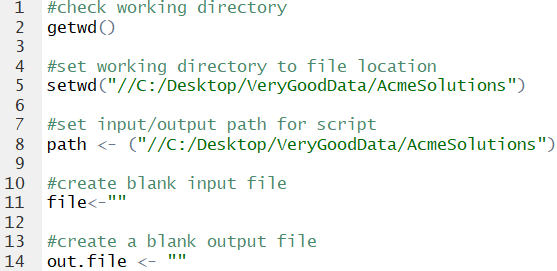
As always with R, the first step is to check your working directory, and reset it if necessary. We also need an input/output path (location), a blank input file, and blank output file.
Next, we need to limit which text files in the folder we want to import. Using the ‘path’ bit we set up before, we add a dataframe to our workspace that lists the names of text files that have ‘abc244’ in the title.

Now, we move to the loop. Using the length of the file.names dataframe, we tell our loop how many iterations to run. Then, we employ the command ‘read.fwf’, which tells R that the file has fixed widths. Luckily, we have access to a data dictionary and are able to quickly write out the width of each column in the file. While we only need two columns in each file, having the script set up to create a dataframe with all available data means that if we need access to other columns in the future (a likely scenario), the script can be quickly adjusted to pull out that data for insertion into the warehouse.
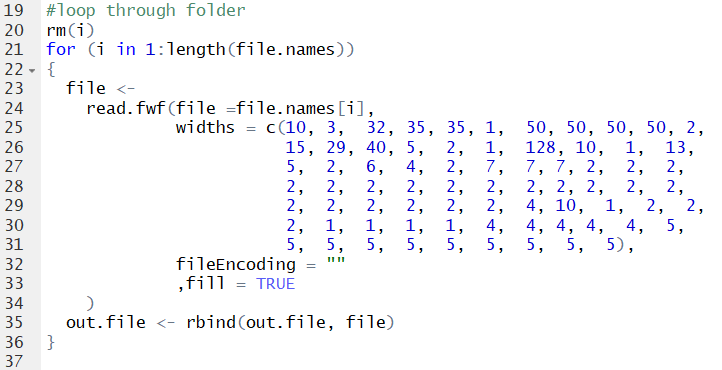
At this point, we have a dataframe within R called out.file that houses all of the data from the original fixed width text files. Now, we have some new issues to contend with. The data contains duplicate rows, and is also too large to fit in a single CSV file. So we need to a way to de-dupe the data, and split it across multiple csv files so it can be inserted into SQL Server.
First, we select the essential data we need for import. Then, we use the dplyr package to run a process to dedupe the data. Lastly, we need some quick variables; since the dataframe is about 3 times the maximum length of a .csv file, we split it into thirds.

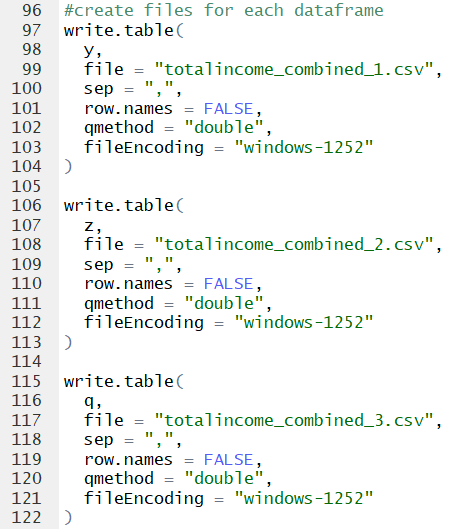
At long last, we export the data into three files, each pristine and ready for import to SQL Server.
Comments? Questions? Leave us a note below!
 Very Fine Data